
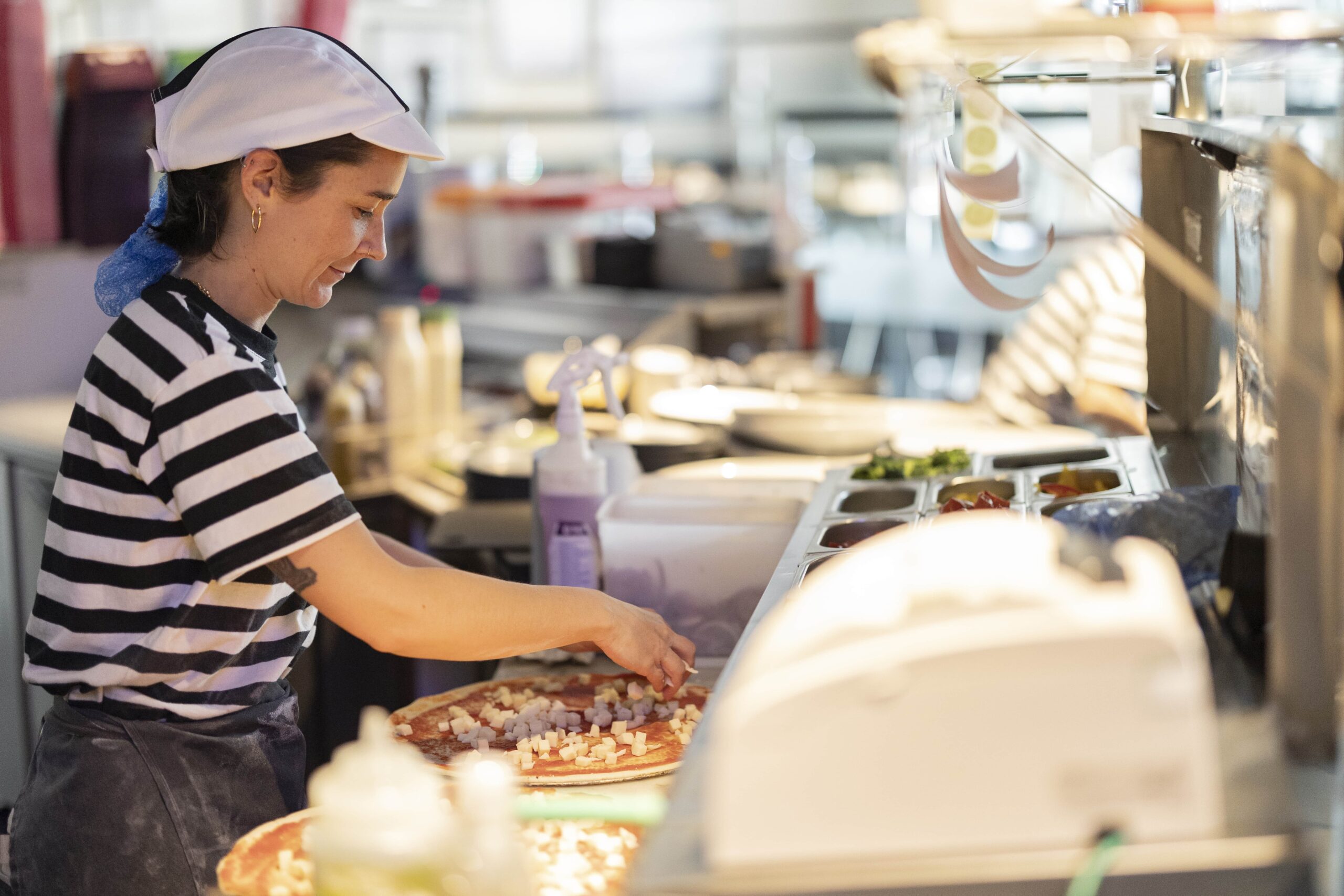
Keep the Pizza Flowing: KDS Tips for a Seamless Kitchen
Pizzerias operate at a unique pace where timing, accuracy, and efficiency are critical. One bottleneck in the kitchen can ripple through the entire operation, leading to delays, errors, and unhappy customers. A Kitchen Display System (KDS) offers a powerhouse of a solution, replacing outdated paper tickets and guesswork with streamlined, real-time order management.
If you’re ready to improve your kitchen’s performance, here’s a deeper dive into how you can leverage a KDS to optimize operations, empower your staff, and ultimately serve a better experience for your customers.
1. Transform Order Management into a Competitive Advantage
When orders come in through multiple channels—dine-in, takeout, and third-party delivery apps—juggling priorities is a challenge. A reliable KDS consolidates all orders into a single digital platform, eliminating confusion and ensuring that every ticket is accounted for.
Value Tip: Use KDS filters to organize orders by preparation time, type, or source. For example, set up auto-prioritization for orders that require longer baking times, like deep-dish pizzas, so they’re queued first. This minimizes delays and synchronizes orders for multi-item pickups.
2. Minimize Errors with Customizable Displays
Every pizzeria has its nuances, whether it’s specific toppings, custom crusts, or specialty pies. Miscommunication about these details can lead to costly errors and dissatisfied customers. A KDS lets you highlight these nuances clearly, ensuring your staff gets it right the first time.
Value Tip: Configure visual cues, such as allergy warnings or high-priority orders, to appear prominently on the display. Additionally, use a touchscreen interface to allow staff to confirm order accuracy before moving it to the next station.
3. Integrate KDS with Inventory Tracking for Efficiency
Over or underestimating ingredient needs can hurt your bottom line. A KDS integrated with your inventory system can track ingredient usage in real time, helping you maintain the right balance and avoid waste.
Value Tip: Use inventory alerts tied to your KDS. For example, if you’re running low on mozzarella, the system can notify staff or managers, ensuring timely reordering without disrupting operations.
4. Optimize Workflow with Station-Specific Displays
A well-designed KDS goes beyond one-size-fits-all solutions. It allows you to route different parts of an order to the appropriate station—e.g., pizzas to the oven station, wings to the fryer station—so staff can focus on their tasks without overlap or confusion.
Value Tip: Implement station timers visible on each display, showing staff exactly how much time they have to complete each step. This ensures orders stay on schedule and are ready for simultaneous pickup or delivery.
5. Enhance Customer Satisfaction with Transparent Delivery Tracking
In today’s on-demand world, customers expect transparency. A KDS integrated with a delivery tracking system allows your staff and customers to monitor an order’s status, from prep to the moment it arrives at the door.
Value Tip: Use your KDS to send automated updates to customers about their order’s progress. Not only does this enhance trust, but it also reduces the number of customer inquiries during busy hours.
6. Improve Employee Satisfaction and Retention
Happy employees are productive employees. A clutter-free, efficient workspace made possible by a KDS reduces stress and makes tasks easier to manage. Additionally, when staff are confident that their tools work efficiently, they’re more likely to feel engaged and valued.
Value Tip: Involve your team in customizing the KDS workflow. Their feedback on the most intuitive layouts and features will make adoption smoother and ensure the system works for them, not just management.
7. Adapt Quickly to Changing Trends with Flexible Integration
Whether you’re launching a ghost kitchen, expanding delivery options, or introducing a new menu item, a flexible KDS can help you scale without disruption. Look for systems that easily integrate with new delivery platforms or marketing tools to stay ahead of the competition.
Value Tip: Use your KDS to test limited-time offers or new menu items by tracking prep times, order popularity, and customer feedback. This data can guide your next big innovation.
8. Think Beyond the Kitchen: A Holistic Ecosystem
The real power of a KDS lies in its ability to connect with your broader restaurant ecosystem. From POS integration to marketing analytics, a seamless KDS can drive efficiency beyond the kitchen, touching every part of your business.
Value Tip: Consider KDS systems that integrate loyalty programs or customer feedback surveys directly into the ordering process. This allows you to gather insights and build stronger relationships with your customers while still focusing on operational efficiency.
Keep the Pizza Flowing, Effortlessly
Your kitchen is the heart of your pizzeria, and a Kitchen Display System ensures it beats at a consistent, efficient rhythm. By leveraging advanced KDS features and tailoring them to your unique workflow, you can reduce chaos, improve order accuracy, and keep customers coming back for more.
Ready to unlock the full potential of your pizzeria? Explore Adora POS with integrated KDS today and experience a seamless kitchen transformation.
Schedule a free demo here to see how Adora POS can help you serve your best slice, every time.
Read more
See all articles
Adora POS vs. PAR POS: Which Is Better for Pizza Chains?
RESTAURANT TECHNOLOGY
12 Questions Every Pizzeria Owner Should Ask a POS Vendor Before Switching
RESTAURANT TECHNOLOGY
Future Orders: Book It Now, Charge It on Fulfillment Day
RESTAURANT TECHNOLOGY